#1 Google Analytics 4 Plugin for WordPress

Advanced Google Analytics 4
For WordPress

Get Analytix
Live Analytics
GA4 Powered
Email Reports
WooCommerce Ready
Analytix Plugin Dashboard
Real-Time Analytics

See Who's On Your
Website Right Now

Monitor live visitors the moment they land. Instantly know how many users are active, what pages they're reading, where they're from, and what device they're using — refreshed every 30 seconds automatically.

  • Live Active Users Monitoring

    See the exact number of people browsing your site right now, updated in real time.

  • Device Usage Breakdown

    Split live users by Desktop, Mobile, and Tablet with percentage share at a glance.

  • Top Active Pages & Countries

    Rank the most-visited live pages and top countries driving current traffic.

  • Auto-Refresh Every 30 Seconds

    Data stays fresh without any manual action — or trigger an instant refresh anytime.

analytix › Real-Time Overview
Live
Active Users
10
Users active right now on your website
3
Desktop
30% of users
6
Mobile
60% of users
1
Tablet
10% of users
Page Views Today 10
Auto-refreshing every 30 seconds  ·  Last updated: 16 seconds ago
Top Active Pages Sessions
  • 1 Buy 18k Gold Plated & Water Proof Je… 2
  • 2 Rings – AK Collections 2
  • 3 Adjustable Leaves ring – AK Collecti… 1
  • 4 Beautiful Stainless Steel Black and… 1
  • 5 Black Roman Numerals Stainless Steel… 1
Top Countries Users
  • 🇵🇰 Pakistan 4
  • 🇺🇸 United States 2
  • 🇬🇧 United Kingdom 2
  • 🇮🇳 India 1
  • 🇩🇪 Germany 1
Statistics

What Stats We Are Providing

6 powerful stat categories from Google Analytics 4 — all surfaced directly inside your WordPress dashboard.

01

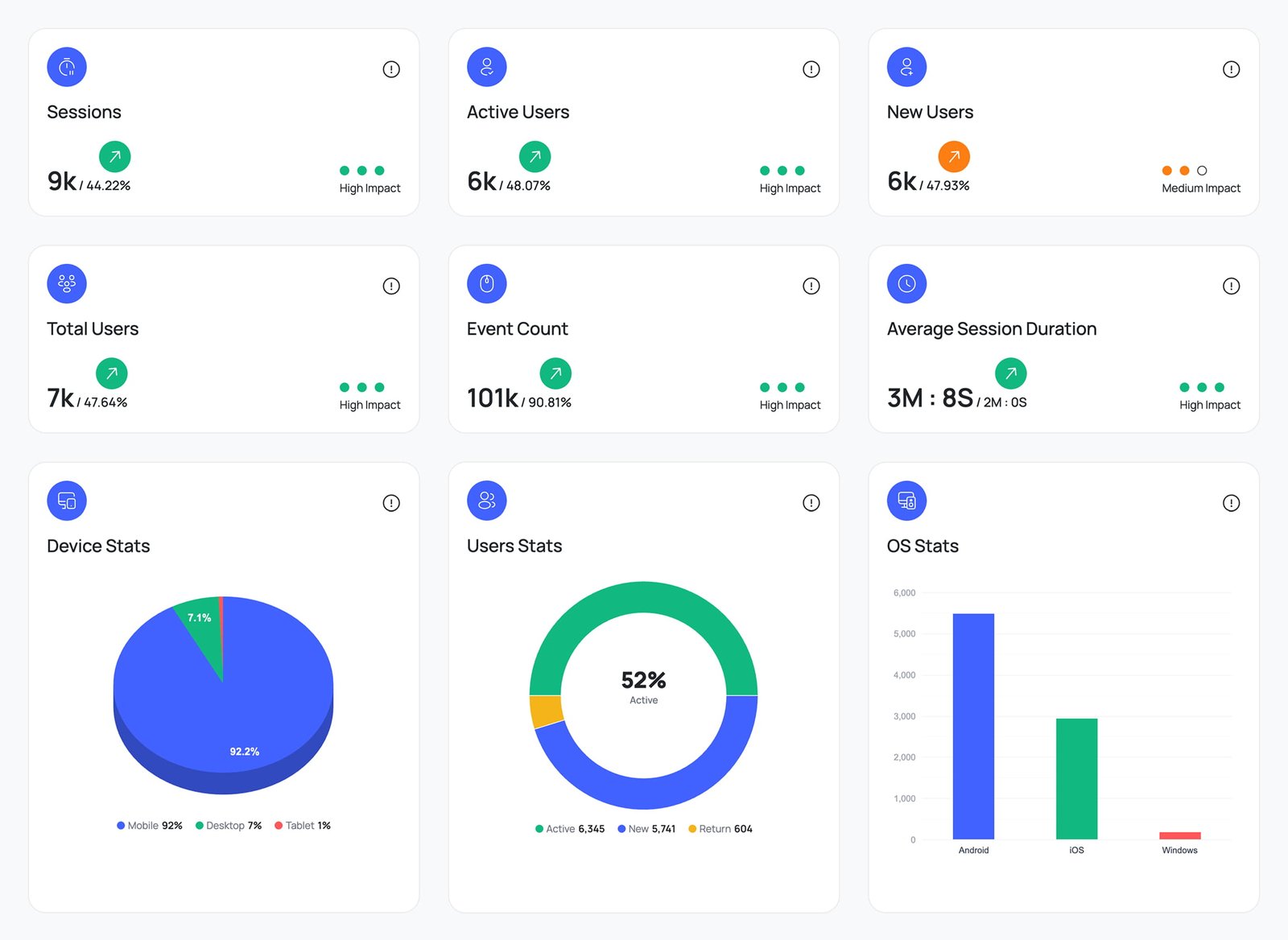
Stats Overview

Get a bird's-eye view of your site's performance with the most essential GA4 metrics on a single dashboard.

  • Sessions 8k
  • Total Users 6k
  • Active Users 4.2k
  • Screen Page Views 21k
02

Geographic Stats

Discover where your audience comes from with country, city, and region breakdowns — including an interactive world map.

  • Countries Tracked 120+
  • City Level Data Yes
  • Region Stats Yes
  • Export PDF / CSV Yes
03

Tech Stats

Understand what devices, browsers, and operating systems your visitors use — and optimise your site accordingly.

  • Device Breakdown Mobile / Desktop / Tablet
  • Browser Stats Chrome 68%
  • OS Stats Win / Mac / iOS
  • Screen Resolution 1920×1080
04

Traffic Acquisition

See exactly how visitors find your website — organic search, direct, referral, social, or paid campaigns.

  • Organic Search 42%
  • Referral Traffic 18%
  • Paid Campaigns 27%
  • Social Traffic 13%
05

Engagement

Measure how users interact with your content — from session depth and page views to event counts and bounce rate.

  • Event Count 63k
  • Avg. Session Duration 1m 42s
  • Engaged Sessions 3k
  • Bounce Rate 55.84%
06

Retention Analysis

Track how many users come back over time with weekly and monthly cohort tables and visual retention rate charts.

  • Weekly Cohorts Yes
  • Monthly Cohorts Yes
  • Avg. Retention Rate 28%
  • Export PDF / CSV Yes
Features

Powerful features, zero complexity

Powerful GA4 analytics built right into WordPress — no coding, no guesswork.

Pre-built reports for every analytics need

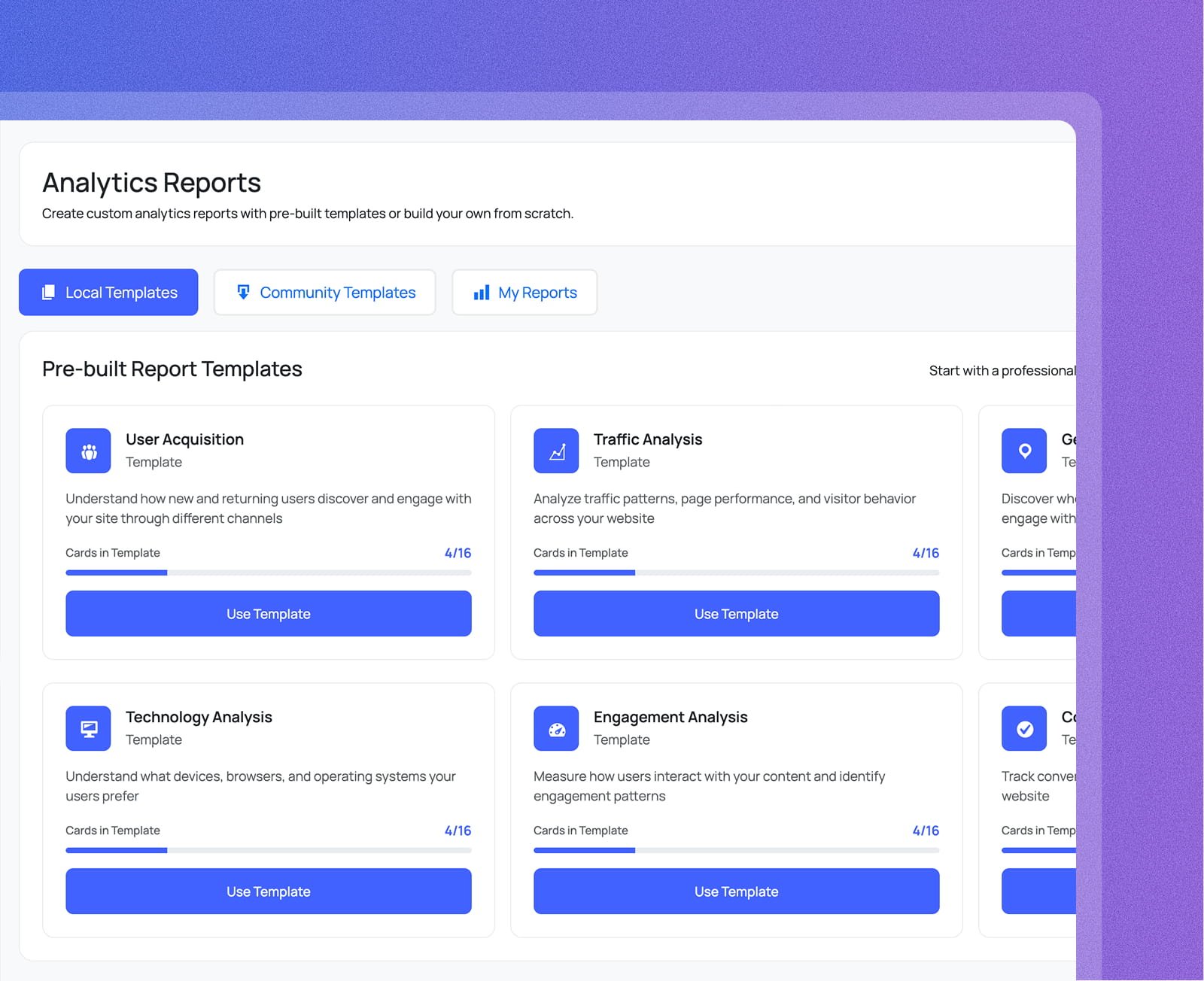
Choose from professionally designed report templates or build your own from scratch — all inside wp-admin, no Google Analytics tab needed.

User Acquisition
Understand how new and returning users discover and engage with your site through different channels.
Traffic & Engagement Analysis
Analyse traffic patterns, page performance, and visitor behaviour — plus measure how users interact with your content.
Local, Community & Custom Reports
Start from a pre-built template, browse community reports, or create fully custom reports tailored to your goals.
Pre-built reports for every analytics need screenshot
User Acquisition
Understand how new and returning users discover and engage with your site through different channels.
Traffic & Engagement Analysis
Analyse traffic patterns, page performance, and visitor behaviour — plus measure how users interact with your content.
Local, Community & Custom Reports
Start from a pre-built template, browse community reports, or create fully custom reports tailored to your goals.

WooCommerce analytics powered by GA4

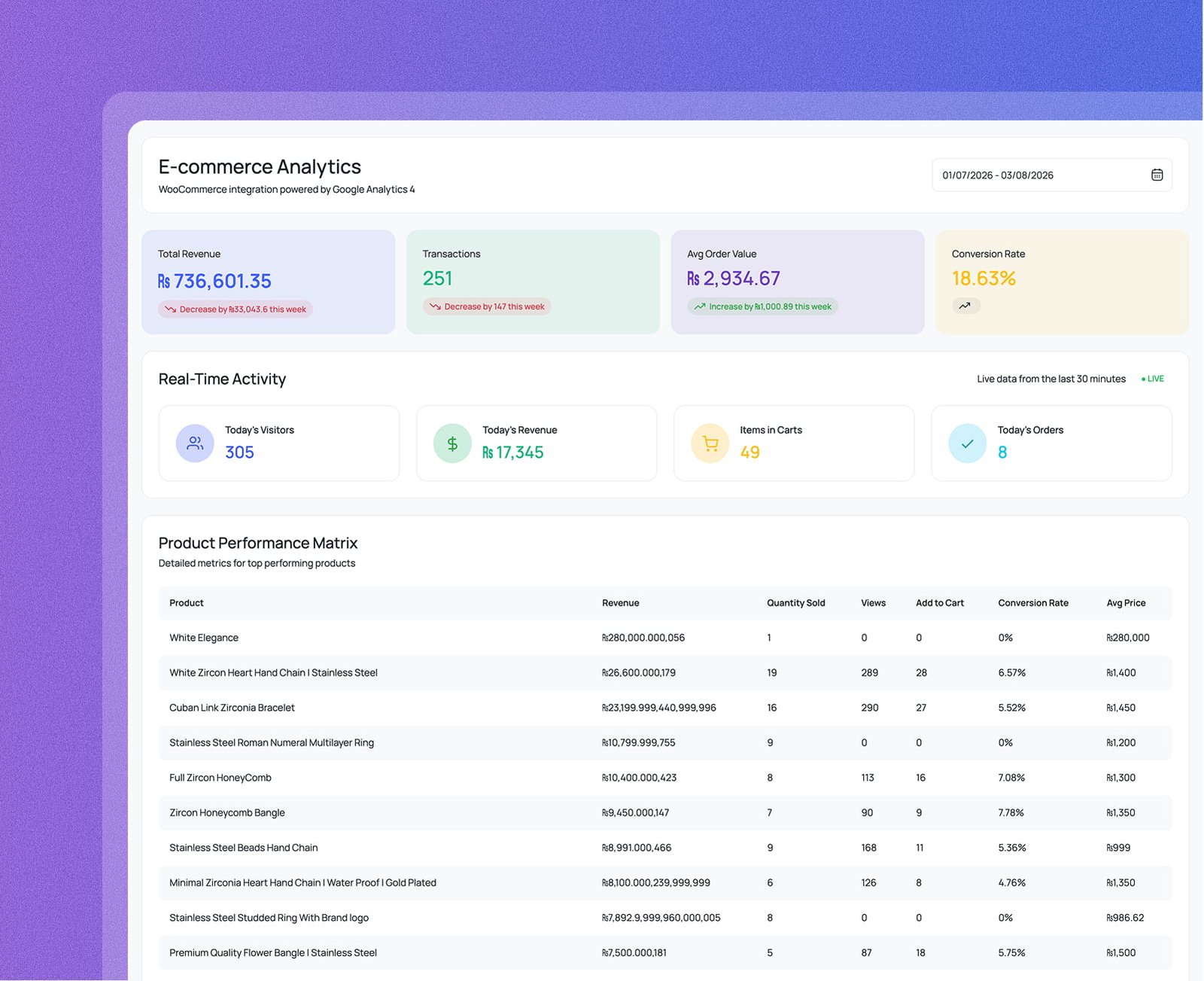
Get a complete picture of your store's performance — revenue, transactions, conversion rate, and real-time activity, all inside wp-admin.

Revenue & Transactions
Track total revenue, number of transactions, average order value, and conversion rate over any date range.
Real-Time Activity
See today's visitors, revenue, items in carts, and orders updated live from the last 30 minutes.
Product Performance Matrix
Analyse each product by revenue, quantity sold, views, add-to-cart rate, conversion rate, and average price.
WooCommerce analytics powered by GA4 screenshot
Revenue & Transactions
Track total revenue, number of transactions, average order value, and conversion rate over any date range.
Real-Time Activity
See today's visitors, revenue, items in carts, and orders updated live from the last 30 minutes.
Product Performance Matrix
Analyse each product by revenue, quantity sold, views, add-to-cart rate, conversion rate, and average price.

Get analytics reports delivered to your inbox

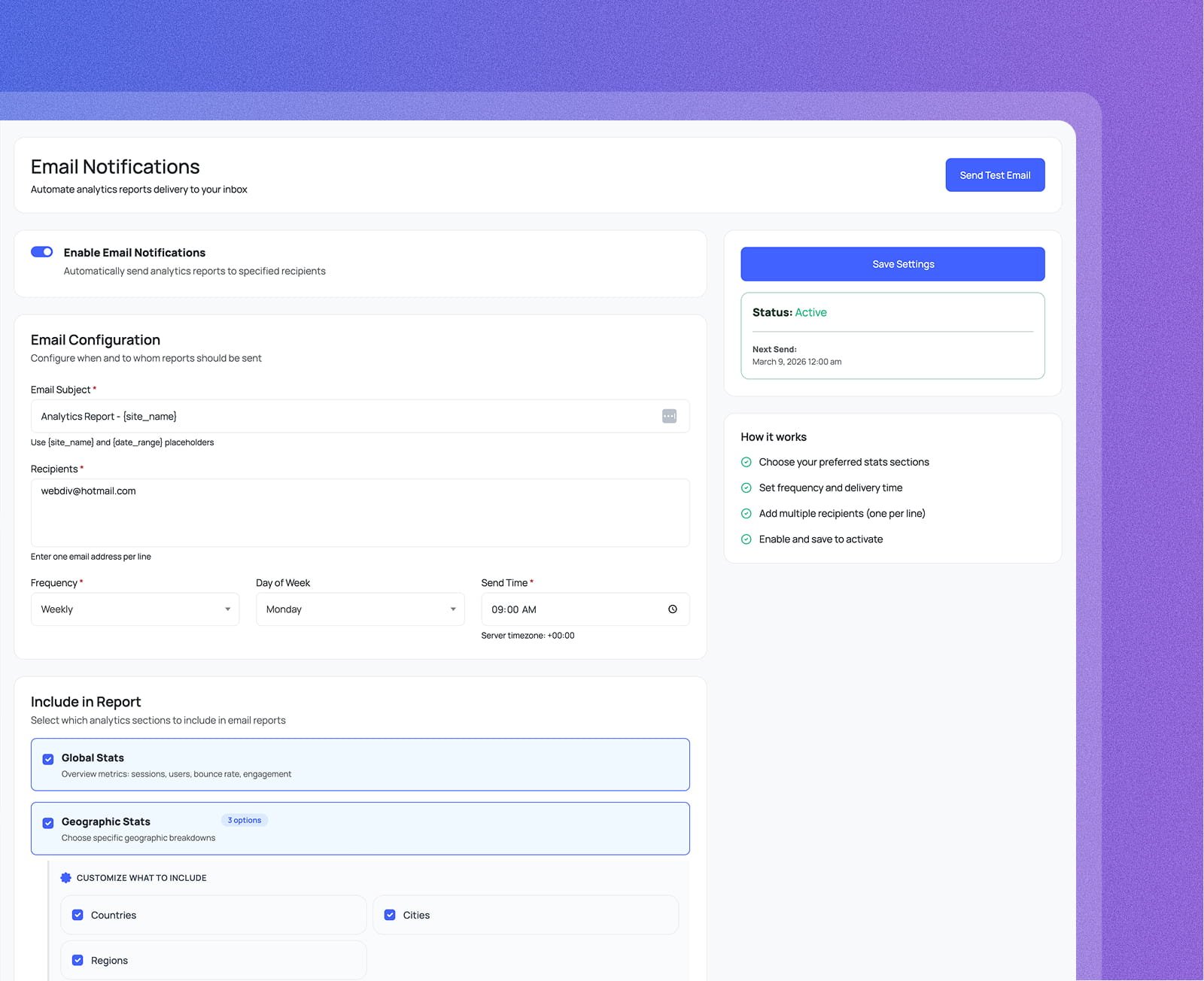
Automate report delivery to any number of recipients — choose what to include, set the frequency, day, and time, then let it run on autopilot.

Flexible Scheduling
Send reports weekly on any day and time you choose. Use [site_name] and [date_range] placeholders for dynamic subjects.
Multiple Recipients
Add as many email addresses as you need — one per line — so your whole team stays informed automatically.
Customisable Report Sections
Choose exactly which analytics sections to include — Global Stats, Geographic Stats (countries, cities, regions), and more.
Get analytics reports delivered to your inbox screenshot
Flexible Scheduling
Send reports weekly on any day and time you choose. Use [site_name] and [date_range] placeholders for dynamic subjects.
Multiple Recipients
Add as many email addresses as you need — one per line — so your whole team stays informed automatically.
Customisable Report Sections
Choose exactly which analytics sections to include — Global Stats, Geographic Stats (countries, cities, regions), and more.
...and so much more!
Why Analytix

Why Choose Analytix?

Everything GA4 offers — sessions, users, revenue, rankings, events — surfaced
inside WordPress where you actually work.

Your Entire GA4 Dashboard in WordPress

Sessions, active users, bounce rate, engaged sessions, average session duration, pageviews, and event count — all 10+ GA4 metrics visible inside wp-admin. No GA4 tab, no extra login.

Live Real-Time Visitor Data

See who is on your site right now — active users, live pageviews, and top active pages updated in real time. Know instantly when a campaign lands or a post goes viral.

Per-Post Stats for Every Author

Traffic data appears directly in the post and page list for authors, editors, and contributors — no Google account required. Everyone sees how their own content performs without leaving the editor.

Deep WooCommerce Store Analytics

Revenue, total transactions, average order value, conversion rate, and product performance in one store dashboard. Plus live orders, items in cart, and real-time store activity — all inside wp-admin.

Google Search Console Built In

Search queries, top-ranking pages, impressions, clicks, CTR, and average position pulled directly from Google Search Console — side by side with your GA4 traffic data, no platform switching needed.

Events & Conversions Without Code

Build custom GA4 events with a visual Event Builder, define conversion goals, and track funnel performance — all without touching a line of JavaScript or the GA4 interface.

Campaign & UTM Tracking Built In

Generate UTM campaign URLs with the built-in URL builder and measure exact channel performance — source, medium, campaign, and content — so you know which marketing spend is actually working.

Automated Weekly Email Reports

Schedule recurring analytics reports to unlimited recipients. Choose which sections to include, set the delivery day and time — your whole team gets fresh data in their inbox automatically, every week.

Zero Front-End Performance Impact

Analytix runs entirely server-side inside wp-admin. Data is fetched from the GA4 API and cached — your visitors never load a single Analytix script, so page speed scores stay completely unaffected.

Testimonials

Loved by WordPress Users

See what store owners, bloggers, and agencies say after switching to Analytix.

4.9 / 5.0
Based on 200+ reviews on WordPress.org
Read all reviews

Absolutely the best GA4 plugin available for WordPress. The real-time dashboard saved us hours every week — we can finally see what's happening on our store without leaving wp-admin.

SM
Sarah Mitchell
Marketing Director · TechCorp

Setup was genuinely 2 minutes. The wizard walks you through everything and it just works. The cohort retention table alone is worth the Pro upgrade — I've been waiting for this feature for years.

JO
James Okonkwo
Lead Developer · DevWP Agency

I switched from MonsterInsights and the difference is night and day. Cleaner UI, faster load, and the geographic stats with the interactive world map is stunning. Highly recommend!

PN
Priya Nair
Content Creator · NairBlogs

The Search Console integration is seamless. Seeing GA4 + GSC data side-by-side in one screen has completely changed how I approach content strategy for my clients.

TW
Tom Walters
SEO Consultant · WebSolutions Ltd

The custom event builder is powerful and actually easy to use. I set up conversion tracking for our checkout funnel in minutes without touching a single line of code. Exceptional plugin.

LC
Lin Chen
E-commerce Manager · ShopNest

We manage 40+ client sites and rolled out the Agency plan across all of them. The white-label reports are professional and our clients love receiving them monthly. Best investment this year.

MR
Marco Ricci
Founder & CEO · Ricci Digital
FAQ

Frequently Asked Questions

Everything you need to know about Analytix and Google Analytics 4 for WordPress.

Analytix is a WordPress plugin that connects directly to Google Analytics 4 (GA4) and surfaces your data inside wp-admin — no tab-switching, no GA4 login required. Authenticate once with your Google account, select your GA4 property, and your full dashboard appears instantly: sessions, users, real-time visitors, top pages, traffic sources, device breakdowns, geographic stats, and more. A built-in setup wizard walks you through every step.

Yes — Analytix reads data from your existing GA4 property via the Google Analytics Data API. If you don't have one yet, create a free account at analytics.google.com, add your website as a property, and then connect it to Analytix in under two minutes. The plugin also handles GA4 tracking code insertion automatically, so you won't need to edit any theme files.

The dashboard gives you a full GA4 overview in one place: sessions, active users, new vs. returning users, event count, engaged sessions, bounce rate, average session duration, and screen pageviews. Below that you get sessions by device, top countries and cities, top browsers and operating systems, top pages and landing pages, and traffic channel breakdowns — all filterable by date range.

Yes. Analytix injects per-post stats directly into the WordPress post and page list screens, so authors and editors can instantly see how each piece of content is performing without leaving the editor. You control which post types and user roles get access — contributors and authors can view their own content stats while admins retain full dashboard access.

Absolutely. The WooCommerce E-commerce Analytics add-on gives you a dedicated store dashboard with revenue, total transactions, average order value, and conversion rate alongside a full product performance table. You also get real-time store activity — live visitors, items currently in cart, and today's orders — all visible inside wp-admin without touching the GA4 interface.

The Search Console add-on pulls your Google Search Console data directly into WordPress — search queries, top-ranking pages, impressions, clicks, CTR, and average position. You can track keyword movements and SEO traffic trends side-by-side with your GA4 metrics, giving you a complete picture of organic performance without switching between tools.

Yes. Analytix includes a built-in Event Builder to define and track custom GA4 events without code, a Conversion Tracking module to set and monitor conversion goals, and a Campaign Tracking module with a UTM URL builder so you can measure the exact performance of every marketing campaign you run.

Yes. The Email Notifications module lets you schedule recurring analytics reports — choose which sections to include, set the delivery day and time, and add as many recipients as you need. Your whole team stays informed with fresh data delivered to their inbox automatically, with no manual effort required.

No. Analytix only runs inside the WordPress admin area. It fetches data from the GA4 API server-side and caches the results, so front-end page speed is completely unaffected. Your visitors never load any Analytix scripts — the only front-end addition is the standard GA4 tracking snippet that you would add regardless.

Yes. Analytix is fully compatible with WordPress Multisite networks. Each site in the network can connect to its own GA4 property independently, and the plugin is translation-ready with full i18n support so it works in any language your team uses.

Measure, Understand and Grow Your Audience

Connect GA4 in under a minute. Start making data-driven decisions today.

Get Analytix Now!