Campaign Tracking

Track Every UTM Campaign,
Right Inside WordPress

See every campaign detected in GA4 — facebook/paid, google/organic, instagram/social, and more — with Sessions, Users, Conversions, and Revenue in one table. Build UTM links, create tracked campaigns, and measure performance without leaving wp-admin.
Campaign Tracking inside WordPress
Live GA4 Data
Top Campaign Revenue Tracked
Everything You Need to
Measure Every Marketing Campaign

All GA4 campaigns, UTM link building, and per-campaign revenue tracking —
all surfaced right inside your WordPress dashboard.

All GA4 Campaigns Table

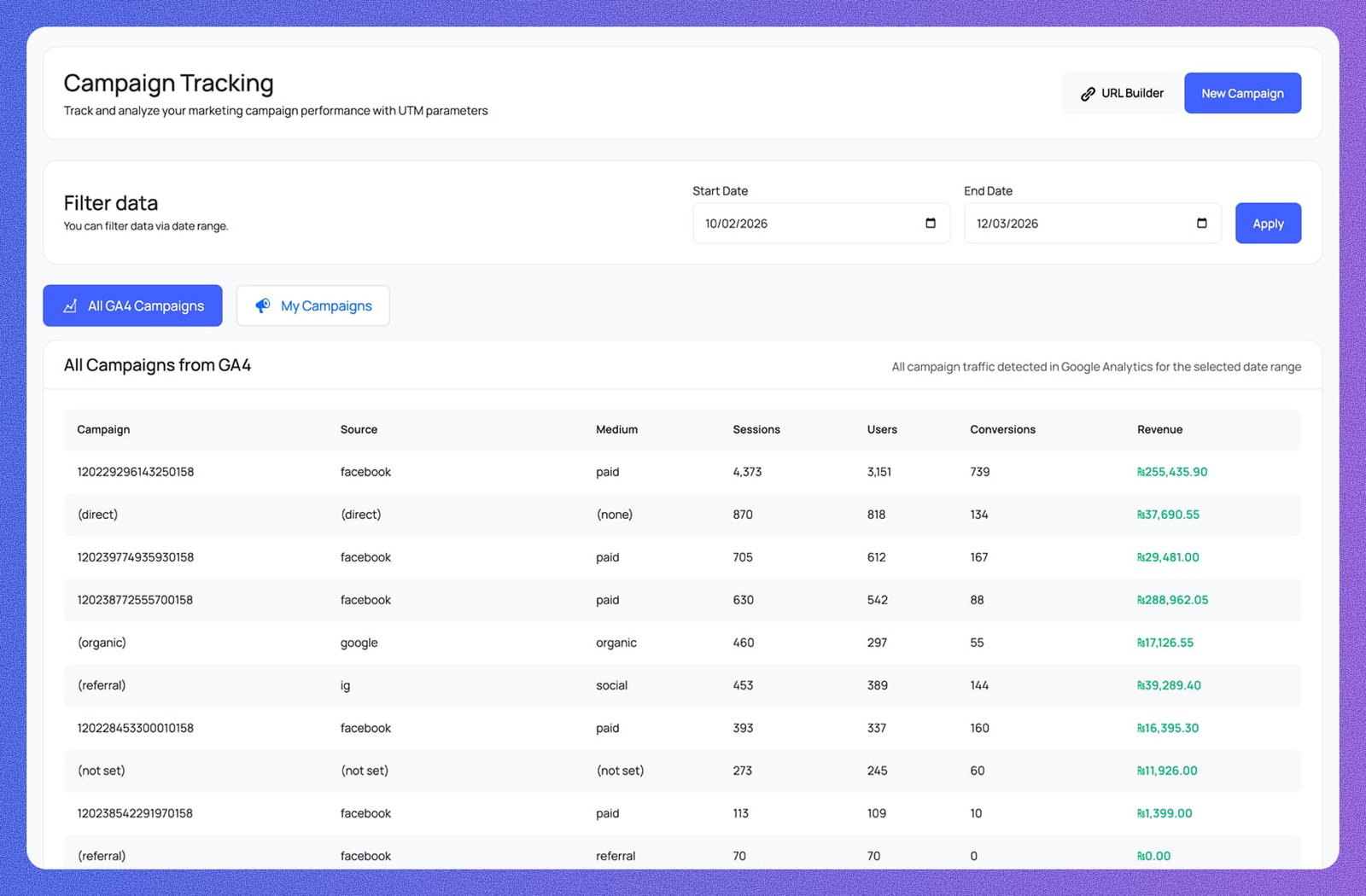
Every campaign detected in GA4 is listed with Campaign, Source, Medium, Sessions, Users, Conversions, and Revenue columns — all campaign traffic for the selected date range in one scannable table.

Date Range Filter

Set a Start Date and End Date, hit Apply, and every campaign row updates instantly. Filter to any window — a single promotion, a month, or a full quarter — without touching GA4.

All GA4 & My Campaigns Tabs

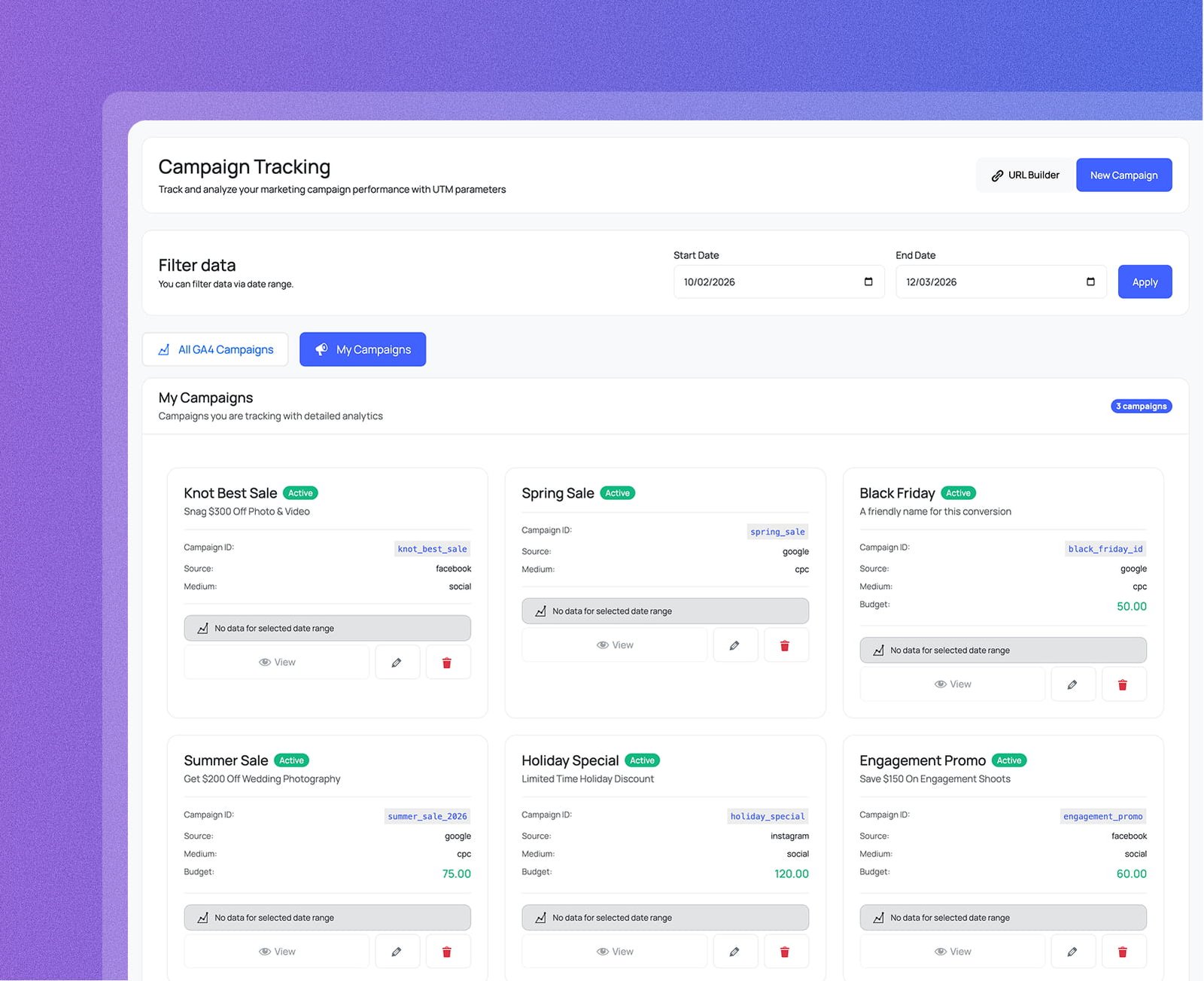
Switch between All GA4 Campaigns — every campaign GA4 has detected — and My Campaigns, which shows only the campaigns you've registered with active status, Campaign ID, Source, Medium, and budget.

My Campaigns Cards

Each registered campaign gets its own card showing Active status, Campaign ID, Source, Medium, and optional Budget. View GA4 performance, edit details, or delete the campaign — all from the same card.

Campaign URL Builder

Enter your Website URL, utm_source, utm_medium, utm_campaign, and optional utm_term and utm_content — the tagged URL is generated instantly. Copy it in one click or save it directly as a new campaign.

Create & Track New Campaigns

Register a new campaign with a name, Campaign ID, Source, Medium, optional Term, Content, date range, budget, and a linked goal. It appears in My Campaigns immediately with Active status and full GA4 tracking.

Every Campaign Metric,
In One WordPress Dashboard

All GA4 campaigns with source, medium, sessions, conversions, and revenue —
plus a built-in UTM builder so every link you create is trackable from day one.

See every GA4 campaign with full performance data

The All GA4 Campaigns table lists every campaign GA4 has detected — Campaign name, Source, Medium, Sessions, Users, Conversions, and Revenue — all filtered by any date range you choose.

Campaign, Source & Medium
Every row shows exactly where traffic came from — facebook/paid, google/organic, ig/social, (direct)/(none) — so attribution is always clear.
Sessions, Users & Conversions
Each campaign shows Sessions, Users, and Conversions side by side — instantly identify which sources drive the most engagement.
Revenue per Campaign
Revenue is shown for every row — identify which campaigns generate real revenue versus those that bring traffic with zero conversions.
See every GA4 campaign with full performance data
Campaign, Source & Medium
Every row shows exactly where traffic came from — facebook/paid, google/organic, ig/social, (direct)/(none) — so attribution is always clear.
Sessions, Users & Conversions
Each campaign shows Sessions, Users, and Conversions side by side — instantly identify which sources drive the most engagement.
Revenue per Campaign
Revenue is shown for every row — identify which campaigns generate real revenue versus those that bring traffic with zero conversions.

Build UTM-tagged links without leaving WordPress

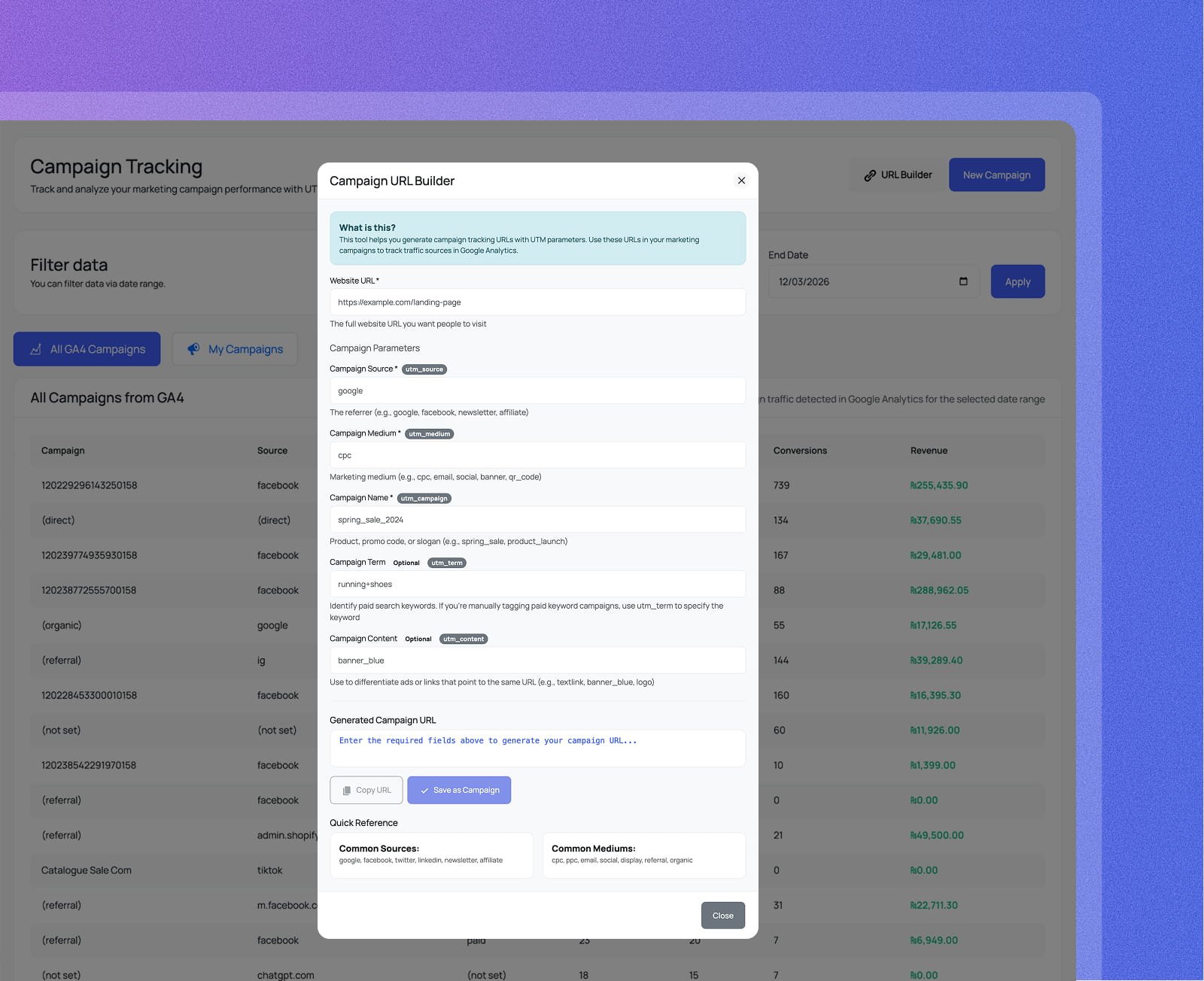
Click URL Builder to open the Campaign URL Builder modal. Fill in your Website URL, utm_source, utm_medium, utm_campaign, and optional utm_term and utm_content — the tagged URL is generated instantly.

All UTM Parameters in One Form
Enter utm_source, utm_medium, utm_campaign, and optional utm_term and utm_content in a single modal — no spreadsheets, no manual string concatenation.
Copy URL in One Click
The generated campaign URL appears instantly as you type. Hit Copy URL to grab it — or Save as Campaign to register it in My Campaigns at the same time.
Quick Reference Built In
Common Sources and Common Mediums are listed right inside the modal — google, facebook, newsletter, cpc, email, social, display — so you always use consistent naming.
Build UTM-tagged links without leaving WordPress
All UTM Parameters in One Form
Enter utm_source, utm_medium, utm_campaign, and optional utm_term and utm_content in a single modal — no spreadsheets, no manual string concatenation.
Copy URL in One Click
The generated campaign URL appears instantly as you type. Hit Copy URL to grab it — or Save as Campaign to register it in My Campaigns at the same time.
Quick Reference Built In
Common Sources and Common Mediums are listed right inside the modal — google, facebook, newsletter, cpc, email, social, display — so you always use consistent naming.

Register and track any campaign you run

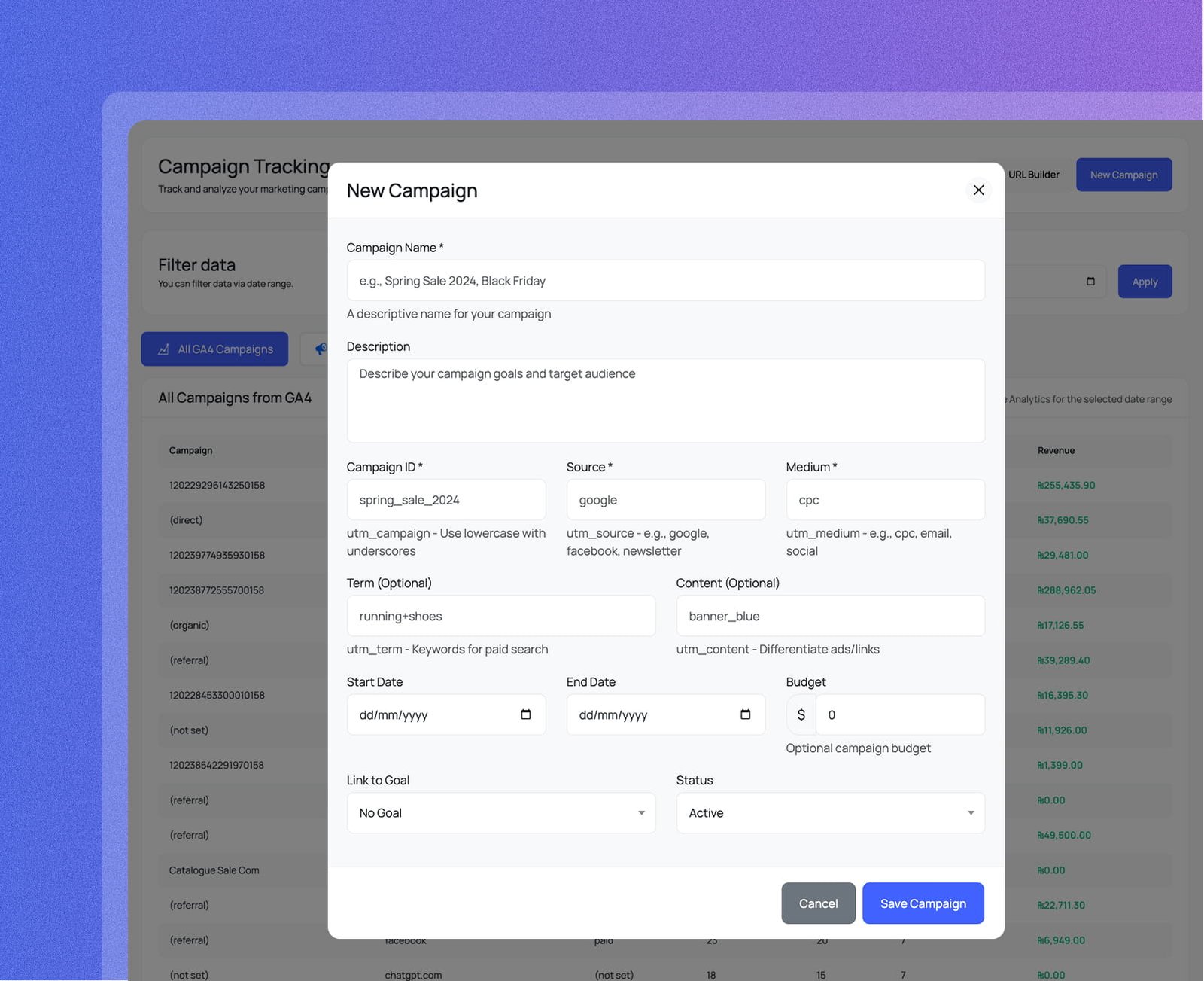
Click New Campaign to open the form. Give your campaign a name, Campaign ID, Source, Medium, optional Term, Content, date range, and budget — then link it to a goal and set its status to Active.

Campaign Name & ID
Set a readable Campaign Name (e.g. Spring Sale 2024, Black Friday) and a Campaign ID that matches your utm_campaign value — so GA4 data maps back automatically.
Budget, Dates & Goal Link
Add an optional budget, set Start and End dates to cap the campaign window, and link it to an existing conversion goal to track performance against a target.
Active Status & My Campaigns
Set Status to Active and the campaign appears in the My Campaigns tab immediately — separate from the full GA4 list, with View, Edit, and Delete actions on its own card.
Register and track any campaign you run
Campaign Name & ID
Set a readable Campaign Name (e.g. Spring Sale 2024, Black Friday) and a Campaign ID that matches your utm_campaign value — so GA4 data maps back automatically.
Budget, Dates & Goal Link
Add an optional budget, set Start and End dates to cap the campaign window, and link it to an existing conversion goal to track performance against a target.
Active Status & My Campaigns
Set Status to Active and the campaign appears in the My Campaigns tab immediately — separate from the full GA4 list, with View, Edit, and Delete actions on its own card.
FAQ

Frequently Asked Questions

Everything you need to know about Analytix and Google Analytics 4 for WordPress.

Analytix is a WordPress plugin that connects directly to Google Analytics 4 (GA4) and surfaces your data inside wp-admin — no tab-switching, no GA4 login required. Authenticate once with your Google account, select your GA4 property, and your full dashboard appears instantly: sessions, users, real-time visitors, top pages, traffic sources, device breakdowns, geographic stats, and more. A built-in setup wizard walks you through every step.

Yes — Analytix reads data from your existing GA4 property via the Google Analytics Data API. If you don't have one yet, create a free account at analytics.google.com, add your website as a property, and then connect it to Analytix in under two minutes. The plugin also handles GA4 tracking code insertion automatically, so you won't need to edit any theme files.

The dashboard gives you a full GA4 overview in one place: sessions, active users, new vs. returning users, event count, engaged sessions, bounce rate, average session duration, and screen pageviews. Below that you get sessions by device, top countries and cities, top browsers and operating systems, top pages and landing pages, and traffic channel breakdowns — all filterable by date range.

Yes. Analytix injects per-post stats directly into the WordPress post and page list screens, so authors and editors can instantly see how each piece of content is performing without leaving the editor. You control which post types and user roles get access — contributors and authors can view their own content stats while admins retain full dashboard access.

Absolutely. The WooCommerce E-commerce Analytics add-on gives you a dedicated store dashboard with revenue, total transactions, average order value, and conversion rate alongside a full product performance table. You also get real-time store activity — live visitors, items currently in cart, and today's orders — all visible inside wp-admin without touching the GA4 interface.

The Search Console add-on pulls your Google Search Console data directly into WordPress — search queries, top-ranking pages, impressions, clicks, CTR, and average position. You can track keyword movements and SEO traffic trends side-by-side with your GA4 metrics, giving you a complete picture of organic performance without switching between tools.

Yes. Analytix includes a built-in Event Builder to define and track custom GA4 events without code, a Conversion Tracking module to set and monitor conversion goals, and a Campaign Tracking module with a UTM URL builder so you can measure the exact performance of every marketing campaign you run.

Yes. The Email Notifications module lets you schedule recurring analytics reports — choose which sections to include, set the delivery day and time, and add as many recipients as you need. Your whole team stays informed with fresh data delivered to their inbox automatically, with no manual effort required.

No. Analytix only runs inside the WordPress admin area. It fetches data from the GA4 API server-side and caches the results, so front-end page speed is completely unaffected. Your visitors never load any Analytix scripts — the only front-end addition is the standard GA4 tracking snippet that you would add regardless.

Yes. Analytix is fully compatible with WordPress Multisite networks. Each site in the network can connect to its own GA4 property independently, and the plugin is translation-ready with full i18n support so it works in any language your team uses.

Measure, Understand and Grow Your Audience

Connect GA4 in under a minute. Start making data-driven decisions today.

Get Analytix Now!